In my daily job I often encounter companies who have paid little to no attention to setting up the right goals for their business. Without any clear focus, business objectives, goals and KPIs you are doomed to fail.
“Why are you running a website?” is the first question I often ask to new clients. You will be astonished about all the answers that I get. Simply a lot of people don’t have a clue on how to answer this question.
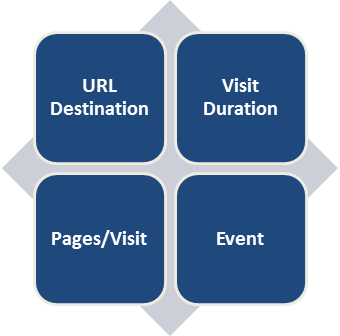
In this article I will discuss the four different Google Analytics goal types and why and when you should use them. Each type is aimed to measure different types of actions/behavior on your website. Setting up the right Google Analytics filters and goals is crucial for your success.
An overview of the goal types is given below:
About Goals
Only someone who has administrator rights to a specific account/website is allowed to set up goals. Nowadays Google Analytics allows you to add 20 goals to a specific website profile:
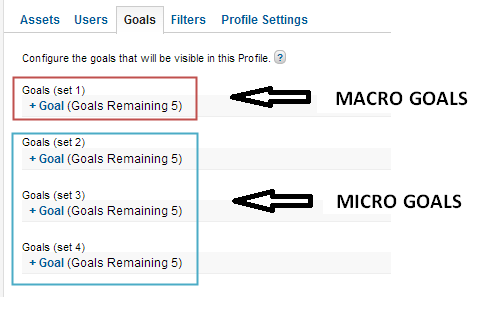
As you can see I like to divide the goals in macro and micro goals.
In my experience five macro goal spots is more than enough, so you don’t need more than one goal set for these goals.
What about the difference between macro and micro goals?
Macro goals: conversions that are directly related to your company’s business objectives. For example: selling a product, selling a magazine abonnement or a donation for a good cause.
Micro goals: conversions that can be indirectly related to your company’s business objectives. For example: a brochure download, watching a demo or filling out a contact form.
Goals, if compared to the E-commerce module in Google Analytics, don’t have a value on default. But you know what? It is so important to set up values for your goals to give them more meaning.
You can better judge how your different traffic sources are doing if you set up relative values for each of your goals. Hereby I mean that sometimes you are not able to define the exact value of a goal and then you should set goal values in perspective of each other.
Let’s discuss the four different goal types in more detail.
1. URL Destination Goals
A URL destination goal is probably the goal type that is the most widely used.
Many conversions on a website happen on a (unique) “thank you” page. A few examples:
- The page a visitor returns to after completing a transaction
- The page a visitor sees after having applied for a job
- The “thank you” page of a newsletter subscription
- The page a visitor sees after submitting a contact form
Great, this looks easy right?
Unfortunately it is not always that easy. A lot of websites do contain pages that don’t have a unique URL. For example, the contact form is displayed on the same URL as the “thank you” page of the contact form. Setting up virtual pageviews can help you a lot then.
2. Visit Duration Goals
Time spent can be a very useful metric. Be aware that it depends on the type of the website whether you strive for high or low visit durations.
On a blog you would like your visitors to engage and spend a lot of time. On the other hand, on FAQ (parts of) a website you like the visitor to find a suitable answer in a short time period.
Google Analytics lets you set up conditional goals on visit duration: greater or less time spent than a defined boundary.
3. Pages/Visit Goals
In my opinion this type of goal lies close to the “Visit Duration” goal type. A lot of people often talk about these goals in term of “engagement” goals. And again, it depends on your website whether you like your visitors to view a few or a lot pages.
It is not always that easy to determine what’s good or bad.
An example, company AB is selling book keeping software. You might think it’s great if your visitors view a lot of pages on your website. Actually, this is not true in all cases.
An effective analysis would be to pick a specific segment where visitors view more than X pages during their visit. X is defined as (far) above your site average.
If you see that the conversion rate of this particular segment is lower than your site average, there might be an issue that explains why these people don’t convert.
In this case, the value of additional qualitative data analysis should not be underestimated. I am a huge fan of combining Google Analytics with tools like Qualaroo and Visual Website Optimizer.
Read this post about the Trinity of Analytics Tools if you like to learn more about this topic.
4. Event Goals
Last but not least, event goals. Google Analytics allows you to measure anything that happens on your website. From simple pageviews to mouse movements.
You just need the right technical scripts to measure anything that you want. I am not saying that you should measure mouse movements; only measure what helps you to optimize your business outcomes.
You can measure (almost) any interaction on your website with the help of Event Tracking. As a rule of thumb I would advise to measure all interactions with events instead of adding virtual pageviews to interactions.
Virtual pageviews do inflate the number of (average) pageviews seen on your website if used incorrectly.
Besides measuring these interactions, it can be incredibly useful to set up an event as a goal in Google Analytics. A few examples of interactions you could measure with Event Tracking:
- A click on a link to a partner website
- A click on a sales support chat button
- A click on the play button of your “brand” movie
- A click on a button to add a recommended product to your basket
I hope you see the value of these four different Google Analytics goal types by now and have a good understanding of why and how to use them. I will finish with some last remarks.
Closing Remarks
- Clearly define your business objectives before setting up your Google Analytics goals
- Don’t use goals in excess; only set up goals that are related and important to your business
- Mix the different type of goals in your Google Analytics account/profile
- Note that goal conversions can only happen once during the same visit; this compared to E-commerce where more than one transaction can be registered during the same visit
- Don’t treat goals in a static way; make changes and add goals now and then
Hello! Great article, thank you.
But i’m trying to understand what’s the difference between the Goals and the regular analytics data. I mean you can find out how many people stay at your site for 3 minutes or more, you can see how many people reach the thankyou.html page, or how many people has clicked on a play button. Maybe the funnel option is really unique, but can you please tell me this difference? I think i’m doing something wrong or i’m confusing about this tools.
Thank you Paul,
Renan
Brazil
Hi Renan,
Thank you for your comment!
It’s true that you can find this information within your regular Analytics data.
However, if you set up goals for specific actions, you can do a lot more. You can set up goal values (to calculate value per visit for a specific channel), automatically see Conversion Rates for each of your goals.
And, something very important, you can segment the data. You could look at goals vs. traffic channel or vs. device type. Many more interesting insights are within your reach.
You can segment virtually any report with goals.
Your regular Analytics data is ok, but doesn’t tell the complete story.
Hope this helps!
Best,
Paul
Yes, thats true, Paul.
Once again, thank you for sharing your thougts.
I found a tool called Paditrack. It helps me to understand and try some funnels too.
Renan
Paditrack is a good tool as well.
You might benefit from reading this post:
http://www.seotakeaways.com/geek-guide-conversion-funnel-optimization-google-analytics/
Another solution, new on the market, is https://heapanalytics.com/.
Have not checked it out yet, but it looks promising!
Best,
Paul