There are many tools and tricks that can make your life with Google Analytics a lot easier. Regular Expressions fall in this bucket.
They can be a pain in the ass if you don’t know how to use them. At the other end of the spectrum, if used in the right way, they are extremely powerful. I will show you 10 different Regular Expressions in Google Analytics and explain how they work in practice.
Let’s start right away with number one: the backslash.
1. The Backslash = \
A backslash “escapes” a character. This is very useful because it turns a Regular Expression character in a normal/plain character. You will very often use it so that’s why I start with this one.
Besides the backslash, there are 10 characters with special meanings: the opening square bracket [, the backslash \, the caret ^, the dollar sign $, the period or dot ., the vertical bar or pipe symbol |, the question mark ?, the asterisk or star *, the plus sign +, the opening round bracket ( and the closing round bracket ). These special characters are often called “metacharacters”.
So it is important to escape them if you want Google Analytics to treat them as a normal character.
An example:
The URL of your website page is http://www.yourdomain.com/?orderid=123456/thank-you. If you want to match this URL in the content report section of Google Analytics you should use this string: /\?orderid=123456/thank-you.
2. The Pipe Symbol = |
The pipe symbol is probably the easiest one to remember, It means or. So if you write car|bike, it means that Google Analytics will match car or bike.
I have another website which is about marathon running. People that come to that website can find a lot of different running schedules. If I only want to see the pages that include 12 or 18 week programs I can simply add 12|18 as a RegEx:

3. The Dot = .
The period or dot matches any character. So when I type .ion it would match lion, zion, but also @ion and %ion. You literally give a wildcard to the character in front of i. It doesn’t match ion because the . need to be filled.
4. The Asterisk = *
The asterisk can be used to match zero or more of the previous character. For example, la*me matches lme, lame, but also laame and laaame.
5. The Dot Star = .*
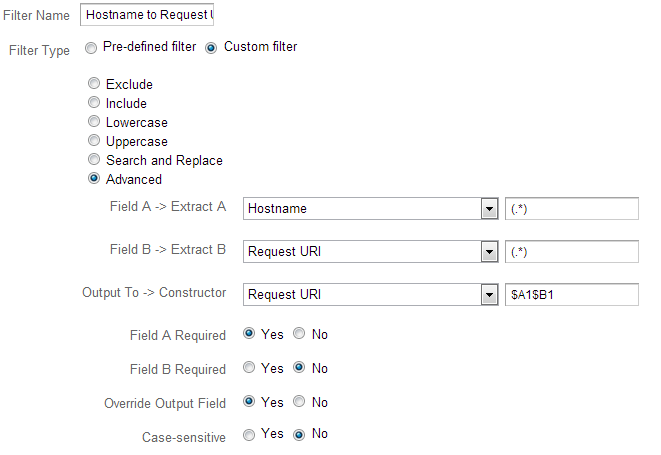
The dot star combination matches any combination of characters on the spot where you place it. You might use the dot star in your profile filters to link your hostname to the request URI:
6. The Caret = ^
With a caret you say to Google Analytics to match only combinations that start exactly the same way your Regular Expression does.
7. The Dollar Sign = $
The dollar sign puts an end to the target string. You use this RegEx if Google Analytics shouldn’t match strings that include characters after the dollar sign.
In my experience the caret and dollar sign are extremely powerful in standard table report filtering and when setting up profile filters. Here you can see an example for the organic searches report:
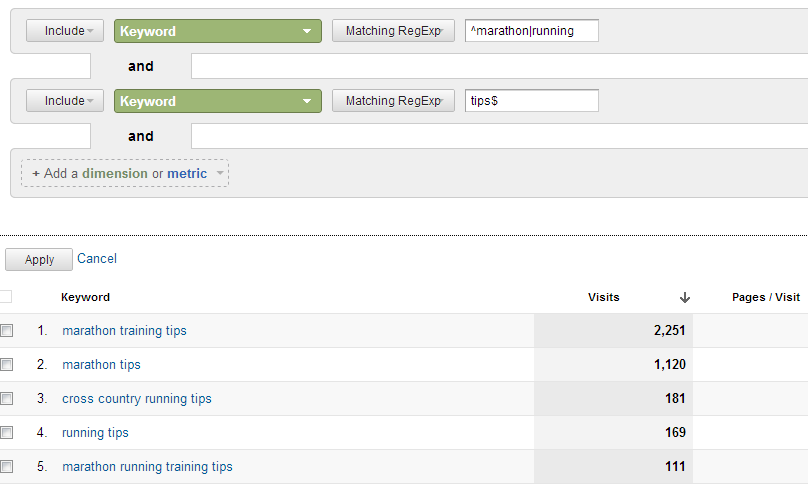
Google Analytics returns the organic search visits that begin with marathon or running and end with tips.
8. The Parentheses = ( )
The parentheses is often used in combination with other Regular Expressions. For example: /car/(green|red)/buy matches two folders, /car/green/buy and /car/red/buy.
9. The Plus Sign = +
The plus sign matches one or more of the previous character. In case of la+me, it would match lame, laame, laaame, laaaame …
10. The Square Brackets = [ ]
The square brackets can help you to make a list. As an example: t[aoui]ll matches tall, toll, tull and till, but doesn’t match toul.
I like to share these closing thoughts:
- Effectively use Regular Expressions in Google Analytics:
– When creating filters
– When setting up goals
– When defining goal funnel steps
– When defining advanced segments
– When using report filters
– When using filters in multichannel reporting
- Try to minimize the process time:
– Make the Regular Expressions as simple as possible
– Avoid using the .* combination (only use when you don’t see other solutions)
– Make sure to escape wildcard or metacharacters
– Use anchors (^ and $) as often as possible
Good luck in becoming a Google Analytics Regex master!
[…] Discover 10 useful Regular Expressions in Google Analytics and become a regex master. They can be applied in the configuration and analyzing phase. […]